The Exceptions page gathers the site's problems into one list, so you can review them in one place, for example at the morning meeting. Each row has a suggested root cause, so you can see whether the carrier, the site or something else was behind it.
Review the list
Open Exceptions in the menu. It shows the site picked in the site switcher, for the last 14 days.
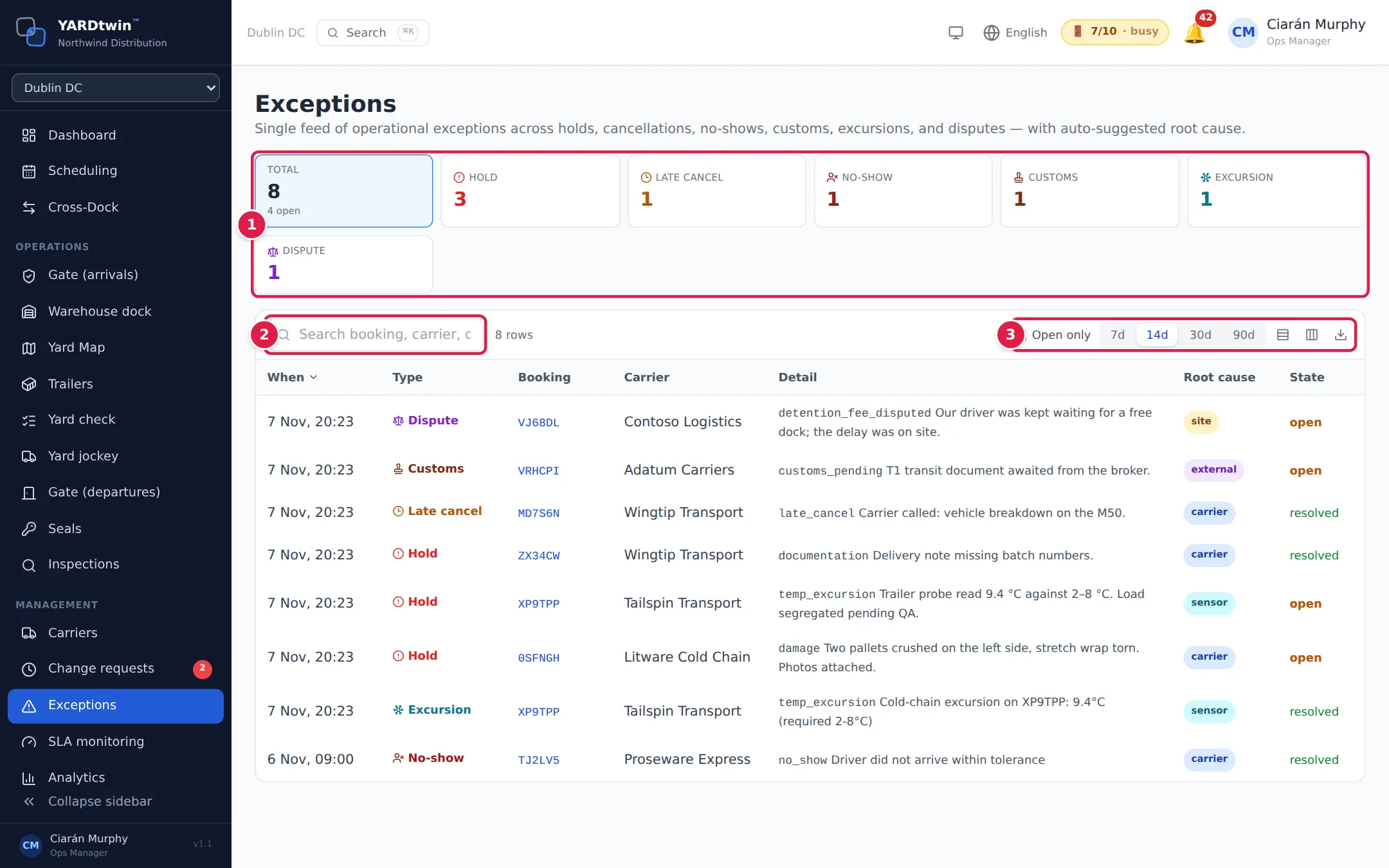
- The tiles count each kind of exception. Total also shows how many are still open. Click a tile to show only that kind. Click it again, or Total, to show everything.
- Search booking, carrier, detail… finds rows by booking code, carrier name or detail.
- Tick Open only to hide resolved exceptions. Click 7d, 14d, 30d or 90d to change the period. The three icons at the right change the row height, show or hide columns, and export the list as CSV, Excel or PDF.
Click a column heading to sort by it. The list starts with the newest first. Click a booking code to open that booking's timeline. See Booking timeline.
Your filters are kept in the page address. Copy the address to share exactly the same view with a colleague.
The six kinds of exception
| Kind | What it is | Open until |
|---|---|---|
| Hold | The dock team put a load on hold, for example for damage, a count mismatch or a temperature problem. See Complete or hold a trailer. | The hold is cleared |
| Late cancel | A booking was cancelled at short notice, inside the site's late-cancellation window. The window is 24 hours unless your administrator has changed it. See Booking rules. | Always shown as resolved |
| No-show | The truck never arrived. | Always shown as resolved |
| Customs | A booking needs customs clearance but its customs documents aren't attached yet, and the truck hasn't left. | The documents are attached, or the truck leaves |
| Excursion | A cold-chain temperature reading was outside the allowed range. See Cold chain. | Always shown as resolved |
| Dispute | Someone disputed something on a booking, such as a detention fee. | The dispute is upheld, rejected or withdrawn |
The When column is when the exception happened. For a no-show, that's the start of the booked slot, in the site's time. For customs, it's when the booking was put on customs hold, or when it was booked if it needed customs from the start.
Root cause
YARDtwin suggests a root cause for each exception from its kind and reason:
| Root cause | Given to |
|---|---|
| carrier | Late cancellations and no-shows. Holds for damage, a count mismatch, a quality defect or documentation. Most disputes. |
| site | Other holds. Disputes about a detention fee, or a dwell that was the site's fault. |
| external | Customs. |
| sensor | Temperature excursions, and holds raised for a temperature excursion. |
It's a starting point for discussion, not a verdict. The Detail column shows the reason code and any note behind it.
If something goes wrong
- "No exceptions in this window." Nothing happened in the period. Try 30d or 90d, or check the site switcher.
- "No … exceptions in this window. Try unticking "Open only"." The filters hide everything. Untick Open only, or click Total.
- You can't find the page. Exceptions is for administrators, ops managers and yard managers.