A consignment is a life-sciences load, such as an investigational medicinal product, a biological sample or a GMP raw material, that needs more care than an ordinary booking. For each consignment YARDtwin keeps its classification and study details, and a chain of custody: every hand-over from one party to the next, linked by hashes so a gap or a later change shows up.
Consignments appears in the menu when an administrator has switched on Site Admin → Features → Life Sciences & Clinical Trials for the site. Without it, the page shows Life Sciences module is not enabled for this site.
Find a consignment and its custody chain
The list on the left shows the site's consignments, newest first: the reference, the status, the governing class, BLINDED and HIGH VALUE tags, and the current custodian. Click one to see its details on the right.
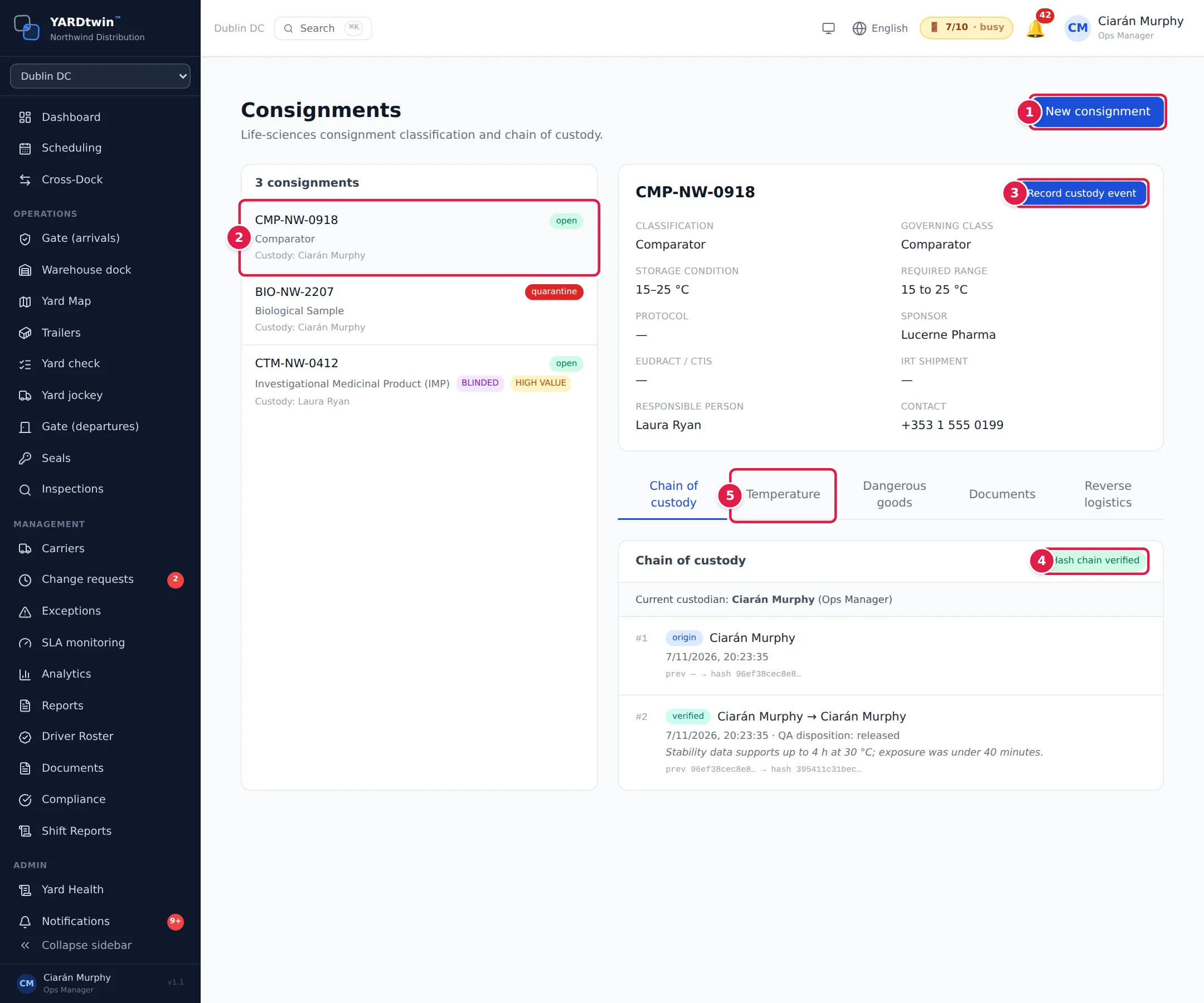
- New consignment creates one (see below). It's shown only to the roles that can create one.
- Click a consignment in the list to open it.
- Record custody event records a hand-over, a receipt, a check or a refusal (see below).
- The chain's status: Hash chain verified when every event links to the one before it, or Chain broken at # and the event number when it doesn't.
- The tabs: Chain of custody, Temperature, Dangerous goods, Documents and Reverse logistics. A red ! on Temperature means an excursion is waiting for QA.
The details panel shows the classification, the Governing class, the Storage condition and Required range, the study references (Protocol, Sponsor, EudraCT / CTIS, IRT shipment), the Responsible person and Contact. The Chain of custody tab shows the Current custodian, then every event in order with its number, type, from and to, time, location, condition and notes, and its link: prev … → hash ….
A status shows where the consignment stands: open, quarantine, rejected or closed. A consignment in quarantine has a red banner, QUARANTINE — departure and dock release are blocked. Only a QA disposition of its excursion releases it; it can't be overridden at the gate. See Monitor the cold chain.
BLINDED consignments hide the product details from anyone outside the privileged roles (by default administrators, QA and ops managers). Other users see [BLINDED] and Blinded — product-identifying data is hidden from your role.
Create a consignment
Administrators, ops managers, operations and gate staff create consignments. Click New consignment. QA and other roles don't see the button.
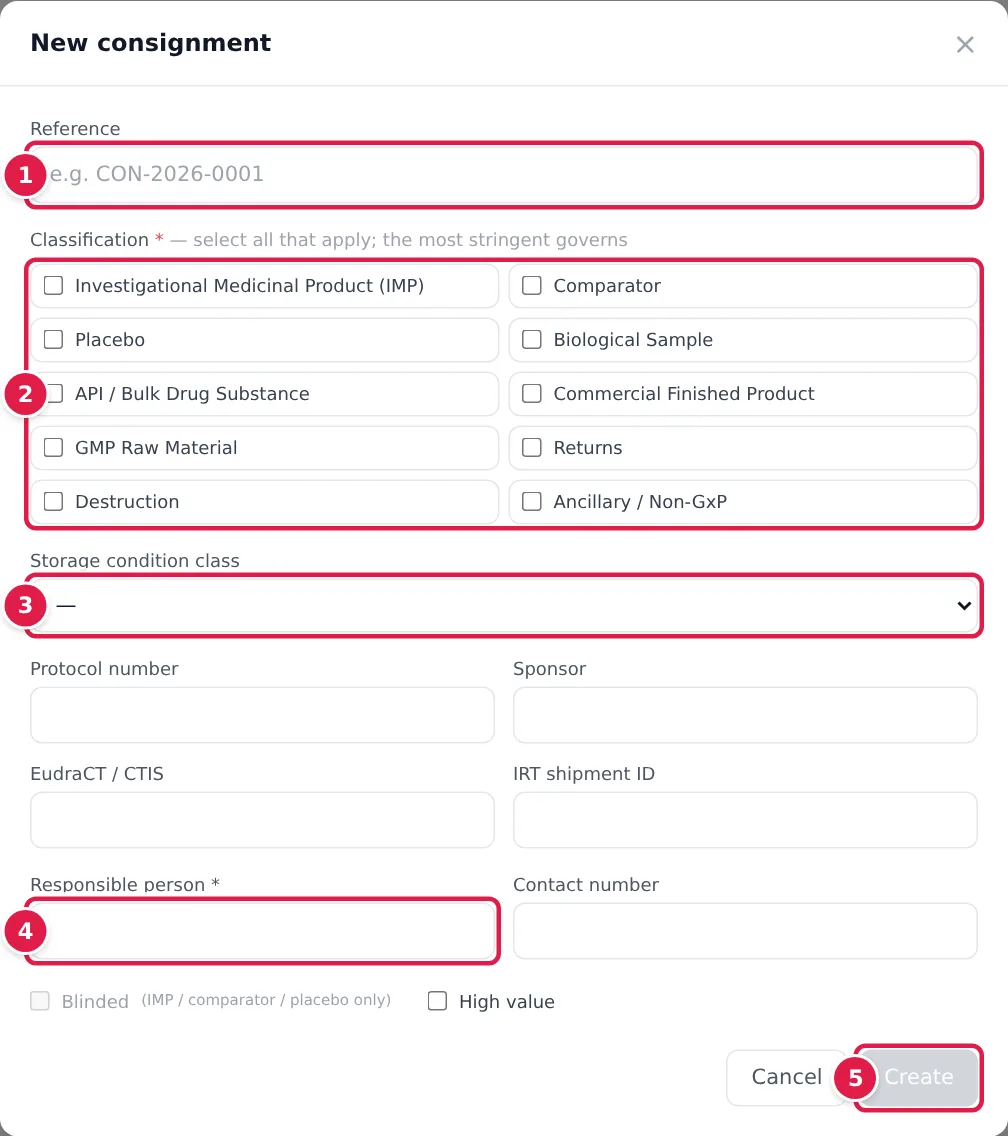
- Reference, for example CON-2026-0001.
- Classification: tick every class that applies, from Investigational Medicinal Product (IMP) to Ancillary / Non-GxP. The most stringent class governs, and the form shows which as Governing ruleset:.
- Storage condition class, such as 2–8 °C or Controlled Room Temperature. It sets the required temperature range.
- Responsible person, and a Contact number. Add the Protocol number, Sponsor, EudraCT / CTIS and IRT shipment ID where you have them. Tick Blinded (IMP, comparator and placebo only) or High value if they apply.
- Click Create. The consignment opens with custody started under your name.
Record a custody event
Click Record custody event. The dialog shows who it's Transferring from: the current custodian of record.
- Event type: Transferred, Received, Verified or Rejected at receipt.
- For a transfer or a receipt, the Receiving party (required) and their Receiving role.
- For a refusal, the Rejection reason, such as Seal broken or missing or Temperature excursion on arrival. Recording a refusal keeps custody with the delivering party. The consignment will be marked rejected.
- The Location (Gate 1, Dock D4), the Condition on transfer (Seals intact, no damage) and Notes.
Click Record. QA can record custody events too. Custody can only pass from the current custodian: an event from anyone else breaks continuity, and your site may refuse it.
The other tabs
- Temperature: the consignment's cold-chain status, its readings and its excursions. Record a reading with its Capture point and Source: A reading outside the required range immediately quarantines the consignment and blocks departure. Gate and operations staff also record the reefer's setpoint and power state, and the data loggers that travelled with the load.
- Dangerous goods: the UN number and dry-ice mass. When dry ice needs ventilating, the tab shows DRY ICE — ASPHYXIATION HAZARD with Start ventilation and Confirm ventilated. The dock can't start work on the trailer until ventilation is cleared.
- Documents: generate a Chain of Custody Certificate or an excursion report. Each carries a number and a SHA-256 hash; Verify a copy checks a file someone sends you against the registered hash.
- Reverse logistics: declare a return, sample return or destruction, then record the collection checklist, the reconciliation, the QA disposition and the certificate of destruction before closing it.
Every custody event, reading and disposition is recorded in the audit log.
If something goes wrong
- "Life Sciences module is not enabled for this site": ask an administrator to switch it on, or choose the right site.
- Create is grey. Tick at least one classification.
- Record custody event is grey. Custody events can only be added to an open consignment.
- Record is grey. A transfer or receipt needs the receiving party; a refusal needs its reason.
- "Insufficient permissions": your role can't do this. QA records custody events, readings and dispositions, but doesn't create consignments, so it has no New consignment button.