A hold stops a load from being treated as good until someone has looked at it. Holds are raised at the dock when a load is completed or put on hold, and some are raised automatically. The QA queue lists every open hold at your sites, newest first.
To open it, tap QA queue in the shift bar at the top of any warehouse screen. Unlike the other warehouse screens, it doesn't need an open dock shift.
QA users don't run dock shifts. Their menu has Warehouse QA queue instead of Warehouse dock, and it opens the queue directly.
Each card shows the reason in red, for example DAMAGE or TEMP EXCURSION, the booking code, carrier and dock, who raised it and when, their note and their photos. Tap a photo to see it full size. The queue refreshes every 30 seconds; Refresh updates it now.
Steps
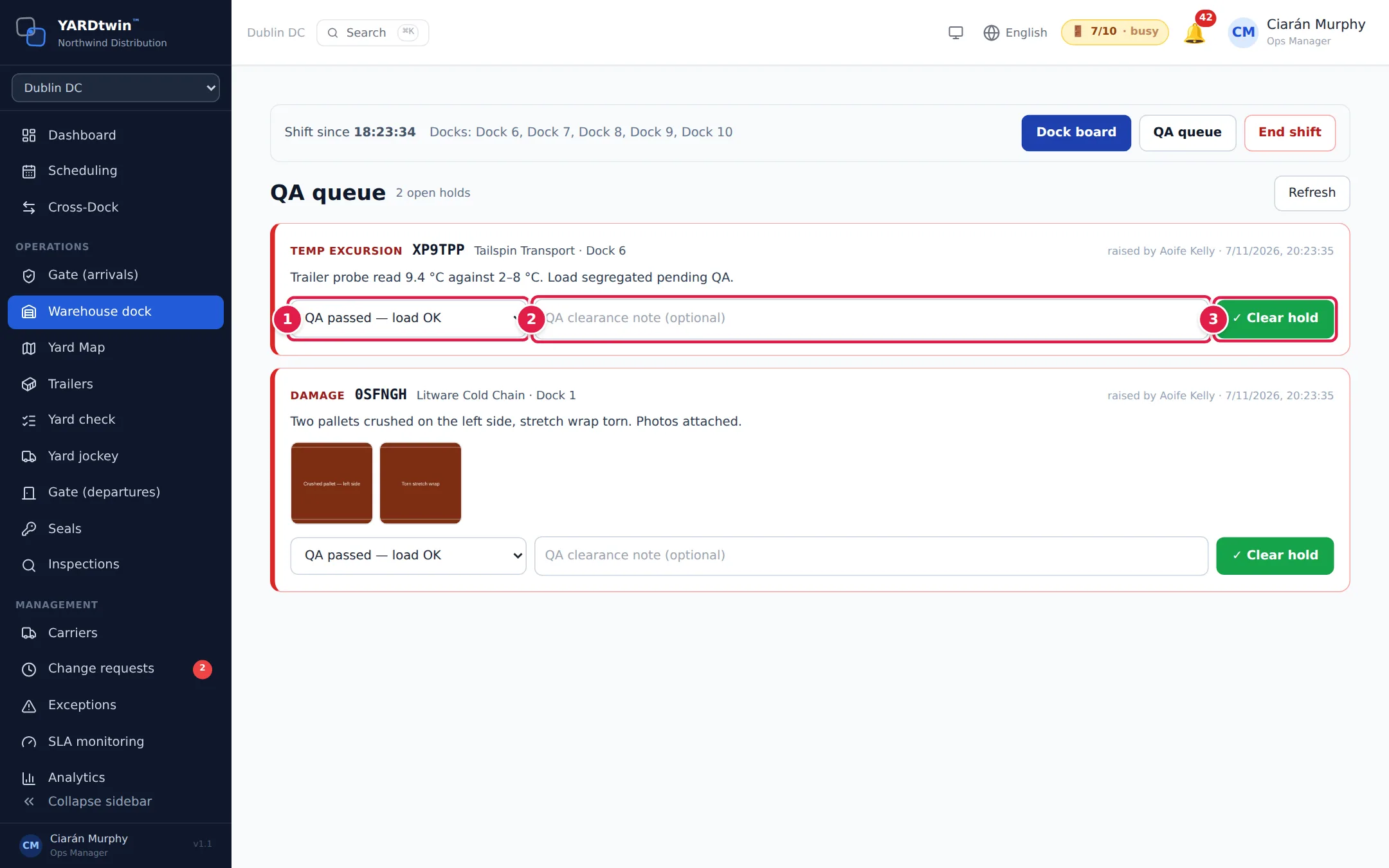
- Pick why the load is fine to release:
- QA passed — load OK
- Damage acceptable / accepted
- Documentation corrected
- Mislabel / labelling corrected
- Override with approval: see below
- Other (detail required)
- Add a note in QA clearance note (optional). For Other, the box becomes Reason detail (required) and needs at least 5 characters.
- Tap ✓ Clear hold. The card leaves the queue, and the clearance is recorded in the audit log with your name, the reason and the note.
Who can clear a hold
- An administrator, ops manager or yard manager can clear a hold.
- QA users can see the queue and approve or reject override requests. They can clear holds too where an administrator has switched on QA may clear holds for the site. See Set up the warehouse docks.
- Operations staff can see the queue but not clear holds.
- Nobody clears a hold they raised themselves. Their card says You raised this hold — a different person must clear it.
- Dock operators raise holds but don't use the QA queue. The QA queue button isn't shown to them.
Override with approval (four-eyes)
Use this when a hold is released on a documented decision rather than a passed check. It needs two people besides the one who raised the hold.
- Choose Override with approval and write the reason in the note, at least 10 characters.
- Tap Request override approval. The card shows Override requested by … — waiting for a second person to approve.
- A different administrator, ops manager or QA user opens the queue and taps Approve override or Reject override.
- Once it's approved (Override approved by … — the hold can now be cleared.), someone other than the approver chooses Override with approval, writes a reason of at least 5 characters, and taps ✓ Clear hold.
The request, the decision and the clearance are all recorded in the audit log. An approval is valid for 24 hours.
What a hold blocks
- An outbound load with an open hold can't leave the site. The gate sees the departure check Warehouse hold cleared fail, and it can't be overridden at the gate.
- On an inbound load the hold marks the received goods for QA; it doesn't stop the empty truck from leaving.
If something goes wrong
- "Insufficient permissions": your role can't open the queue or clear holds. Ask an administrator, ops manager or yard manager.
- "You raised this hold — a different person must clear it": ask a colleague to clear it.
- "Reason detail (5+ chars) required when reason is "other"."
- "Write the reason for the override in the note (10+ characters), then request approval."
- "An override request for this hold is already pending": someone has already asked. Wait for the decision.
- "Override with approval needs an override request for this hold that a second person has approved": request approval first.
- "The approver of the override cannot also clear the hold — four-eyes needs a second individual": someone else has to clear it.
- "Already cleared": a colleague cleared it a moment ago. Tap Refresh.