Most trucks pass the checklist without trouble. This page covers the ones that don't: refusing entry, a seal that doesn't match the booking, missing paperwork, and a truck or driver that isn't the one booked.
Refuse entry
Use Deny when a truck must not come in.
- Open the booking from the arrivals list and tap Deny, next to Authorise entry. Choose the reason:
- Seal number mismatch
- Paperwork missing or invalid
- Trailer does not match booking
- Driver does not match booking
- Rejected by operations
- Other (specify below)
- Add detail in the box underneath. It's optional, except for Other, where it's required.
- Tap Confirm denial.
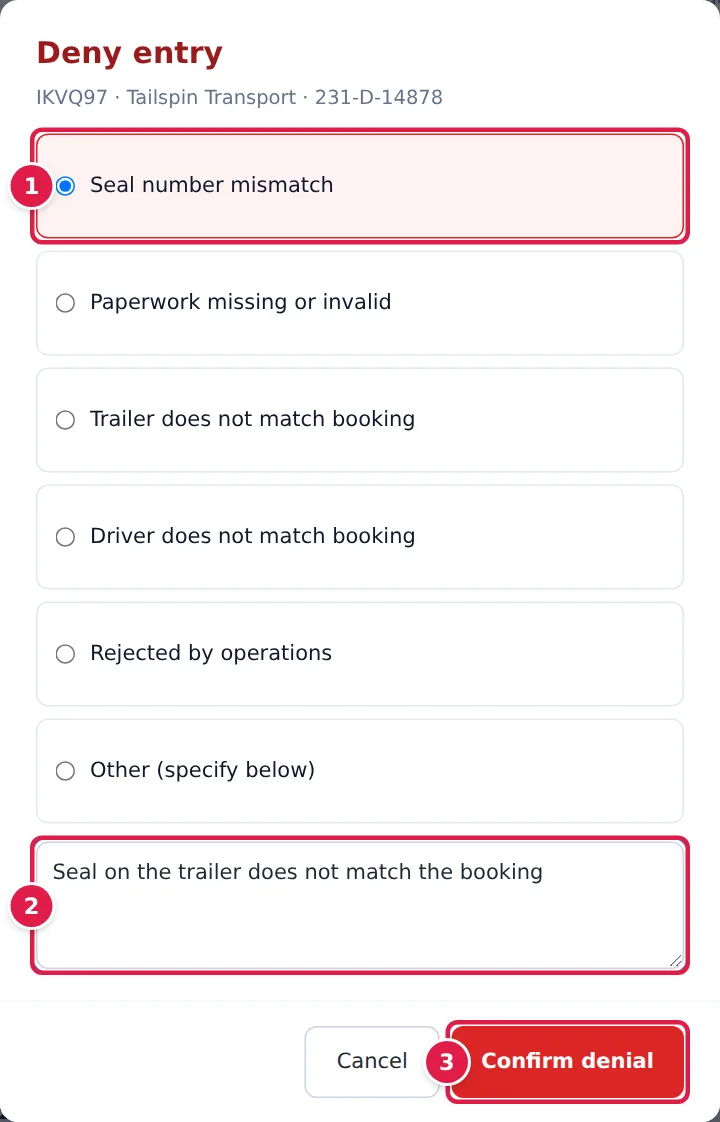
YARDtwin records the denial against the booking and your shift, with your name, the reason and the time. It's written to the GMP audit log and counted under Denials in the shift strip. Any lock your gate held on the booking is released, so it can be opened again at any gate. The booking itself isn't cancelled or changed.
The seal doesn't match the booking
Open Seal number matches booking in the checklist and photograph the seal as usual.
- Check the Seal number YARDtwin read from the photo, and correct it if it misread. If it differs from the booking's Expected seal, you'll see ✗ Does not match booking seal.
- Decide what to do:
- To let the truck in, type why in Manual override, for example the driver's explanation. The reason needs at least 5 characters and is written to the GMP audit log.
- To refuse it, close the item and deny entry with Seal number mismatch, as described above.
- Tap ✓ Confirm seal, then carry on with the checklist.
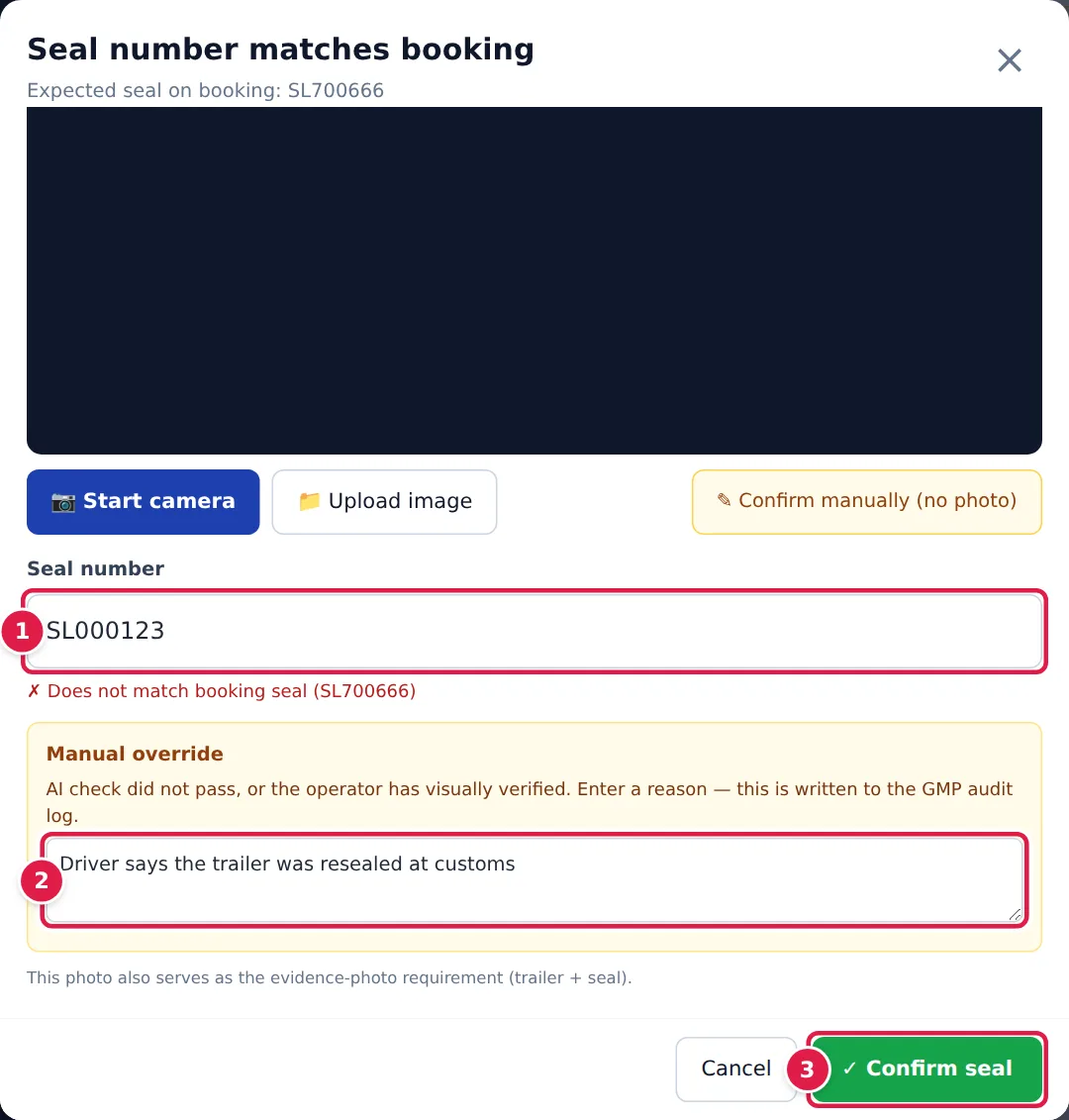
When you authorise a truck whose seal didn't match, YARDtwin still lets it in, and it also:
- records the seal as mismatched on the seal audit trail,
- puts the booking on compliance hold,
- alerts the site's ops managers with a Seal Discrepancy notification.
A compliance hold doesn't stop the truck at the gate. If the load carries goods out of the site, its departure is held until an administrator, ops manager or QA reviews the seal and releases it with a reason. They can do it with 🔓 Review & release on the seals page, the dock board or the departure screen, for inbound and outbound loads alike. See Clear a truck to leave.
The trailer has no seal at all? Tap ⊘ No seal present at the top of the seal item. You can add detail, such as seal broken at origin. YARDtwin records No seal present on trailer in the audit log. Tap ✓ Confirm — no seal.
Paperwork is missing
- The CMR is missing or not signed. Don't confirm CMR present and signed. Either wait for the driver to produce it, or deny entry with Paperwork missing or invalid.
- A required document is missing (for example a certificate the material needs). Authorise entry stays locked and the line under it says Required documents missing — see panel above. Upload the document in that panel, or deny entry.
The truck, trailer or driver isn't the one booked
- The registration or trailer number is different. Check with the driver and the office. If the truck shouldn't be here, deny entry with Trailer does not match booking.
- The driver isn't the one on the booking, or the licence photo doesn't match the person in front of you. Don't override the driver ID check. Deny entry with Driver does not match booking.
Check-in blocked
Some sites screen drivers before entry. When you tap Authorise entry, a red panel can stop the check-in:
- Driver blocked on the roster: the carrier's roster marks this driver as blocked.
- Site induction not completed: the driver hasn't passed the site's induction, or their pass has expired.
- On the site watchlist: the driver or vehicle matches the site's watchlist.
If your role may override it, type Why is this vehicle being admitted anyway? (at least 10 characters) and tap Override and check in. Otherwise the panel says Your role cannot override this — call an ops manager, QA or an admin. When the induction is missing or out of date, send the driver to take it. See Driver induction.
If something goes wrong
- Confirm denial stays pale. Pick a reason first. For Other, also type a short description.
- ✓ Confirm seal stays grey. Take or upload a seal photo (or confirm manually), make sure Seal number isn't empty, and, if it doesn't match, type an override reason of at least 5 characters.
- You denied a truck by mistake. A denial can't be undone from the gate. The booking is still open, so open it again from the arrivals list and check the truck in.